Re-quote an Insurance Estimate in 60 Seconds
The adjuster shows up. They walk the roof. They hand you a one-page estimate with line items: shingle removal, decking, underlayment, drip edge, ridge cap, dumpster, labor. Numbers on each row. A total at the bottom.
Now you have to re-quote it. Because you have your own materials supplier with different pricing. Your own labor cost. Your own margin. Maybe the homeowner is paying the gap between the adjuster's payout and your actual cost. Maybe you're matching the estimate dollar for dollar. Either way the line items are the starting point and you need them in your own system to send your quote to the homeowner.
Today that's a 20-minute job: scan the estimate or take a photo of it, type each line item into your quoting tool, double-check the numbers, build the quote, send it. Twenty minutes per claim, and there are six waiting in your truck.
Snap to Quote
Snap to Quote isn't a separate button. It rides on the same Walk & Talk capture flow you use for any walkthrough. Open the contact on your phone. Tap Start a Walk & Talk. Take one photo: the adjuster's estimate. Tap Done.
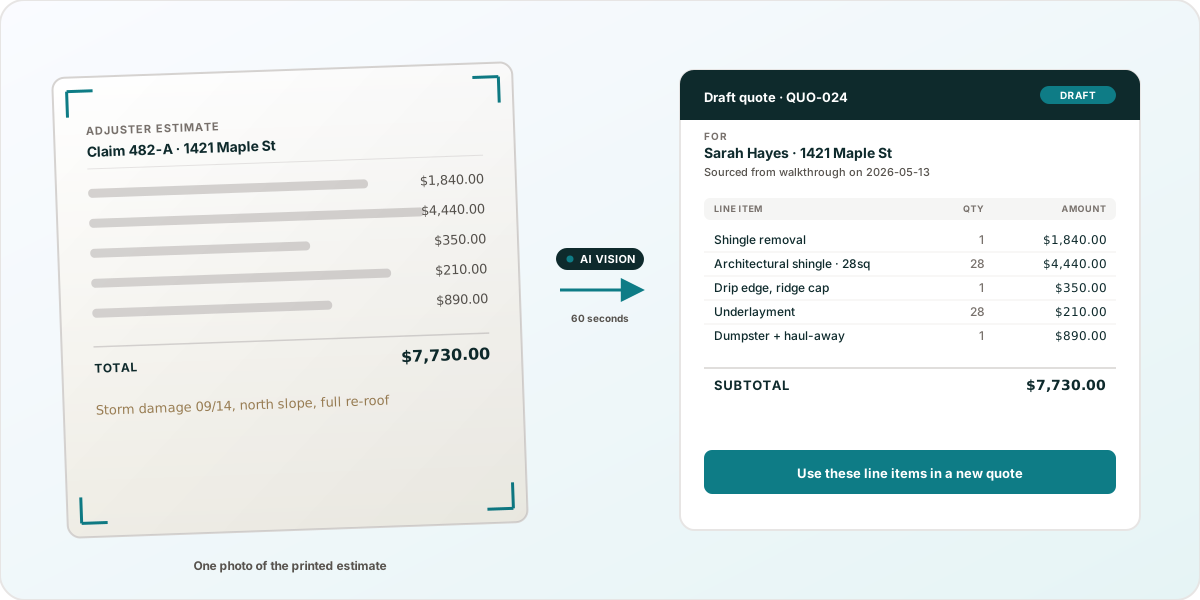
That's it. While the walkthrough is processing, RadiusOS does two things at the same time. The Walk & Talk pipeline writes the AI recap from your audio (if you talked while you walked). The Snap to Quote pipeline reads the photo of the estimate and pulls out every line item.
When you open the walkthrough on the review screen, there's a card titled "Extracted from photos." Inside the card: the line items from the adjuster's estimate, in a table, with quantities and unit prices. At the bottom of the card, a button: Use these line items in a new quote.
One click and RadiusOS:
- Creates a draft Quote on the homeowner's contact record
- Drops in the extracted line items so you can review and edit pricing
- Stamps the source - the Quote knows which photo it came from so you can audit later
- Opens the Quote editor
Total time from photo to quote-editor-open: about 60 seconds, most of which is the AI pipeline finishing. Total typing required: zero.
Where this lives in the product
Snap to Quote is one piece of Walk & Talk, the mobile capture flow on every Pro contact. Same button, three different things you can do with it:
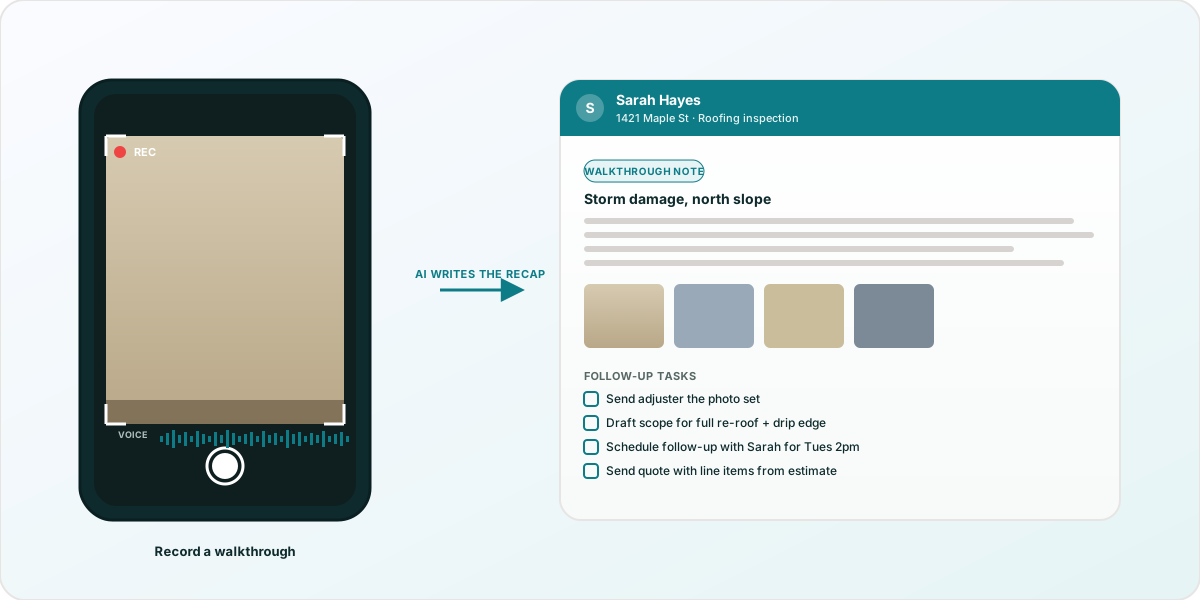
The help-center articles cover each piece end-to-end:
- Walk & Talk - the core capture flow. How to record on iPhone or Android, what the review screen shows, how the audio retention works, and what gets saved to the contact when you approve.
- Snap to Quote - the photo-to-line-items pipeline this post walks through. Includes the "what makes a good photo" rules, the Review badge for low-confidence rows, and the per-walkthrough limit (up to 12 photos).
- Send a walkthrough for review - once the draft Quote is ready, hand the walkthrough (photos, recap, draft Quote, all of it) to the homeowner or adjuster via a magic link. They mark up photos, comment, and Approve, Request changes, or Reject. Approval surfaces a "Quotes ready to send" card on your dashboard for one-click delivery.
What about the prices?
Snap to Quote extracts the line items the adjuster wrote down. Their prices, their quantities, their descriptions. That's the starting point, not the finishing point.
In the Quote editor you adjust prices to your numbers. Maybe the adjuster has a shingle removal line at $1.20/sq ft and your actual cost is $1.45. Edit the number. Maybe the adjuster left off the chimney flashing. Add a line. Maybe the adjuster paid for a 30-yard dumpster and you only need a 20. Change the quantity.
The point isn't that the AI got everything right. The point is the line items are in your system in 60 seconds instead of 20 minutes, so the rest of your time is on the work that actually requires judgment: pricing and scope.
When the photo is good vs. when it isn't
Snap to Quote works best on:
- Printed estimates with clear text and a table layout
- Single-page estimates photographed straight-on (not at an angle)
- Decent lighting (not in the truck cab at dusk)
When the photo is borderline, the card flags low-confidence rows with a "Review" badge. The text is still extracted but every value should be double-checked. If a digit was unreadable, RadiusOS uses '?' in the rawText rather than guessing.
For handwritten estimates from old-school adjusters, you'll get more value out of using the photo to remember what was on the page than out of the line-item extraction. That's a known limitation. We're not pretending OCR has solved handwriting.
The Templates That Pair With Snap to Quote
Snap to Quote works on any walkthrough, but the highest-leverage pairings are:
- Roofing Company - re-quote adjuster estimates during storm season without losing 20 minutes per claim to retyping
- HVAC Service - photograph a competitor's estimate or a manufacturer warranty document and pull the data into your own record
- General Contractor - re-quote change orders by photographing the subcontractor's written number and dropping it into the customer's quote
- Plumbing - photograph data plates on water heaters and boilers to capture model + serial + manufacture date in seconds
Get Started
Snap to Quote is part of Walk & Talk on Pro at $19/mo (30 walkthroughs per month) and Business at $39/mo (unlimited). Try it free on the RadiusOS Pro trial.
Sign up free, install the Roofing Company template, and the next time an adjuster hands you an estimate, take one photo. Sixty seconds later you'll have a draft quote with their line items already filled in.
See also: Company Cam Alternative for Contractors Who Also Need a CRM for the broader Walk & Talk story, and the Snap to Quote help article for what the AI can and can't read.
More in Industry Guide
Best CRM and Field Service Software for Painters (2026)
8 real options for painting businesses, honestly assessed: RadiusOS, Jobber, Housecall Pro, DripJobs, PaintScout, Workiz, Kickserv, and CompanyCam.
Best Software for Roofing Companies (2026)
7 real options for roofing businesses, honestly assessed: RadiusOS, JobNimbus, AccuLynx, Roofr, RoofSnap, CompanyCam, and the EagleView measurement layer.
Best Software for HVAC Companies (2026)
7 real options for HVAC businesses, honestly assessed: Jobber, Housecall Pro, RadiusOS, FieldEdge, Workiz, ServiceTitan, and ServiceTrade for commercial.
Ready to try a smarter CRM?
AI-powered deal scoring, automated follow-ups, and a pipeline that fits your workflow. Start free - no credit card required.
Get started free →